
Stroke distances
SVG pathLength and dashes: normalize distances without changing shape
Normalize numeric dash distances while keeping the drawing commands intact.
Want a dash to cover one quarter of a path? Start with pathLength="100" and stroke-dasharray="25 75", not "25% 75%". The numeric pair uses a 100-unit distance scale: 25 for the dash, 75 for the gap. It does not require changing the path's drawing commands. SVG 2 paths SVG 2 dashing
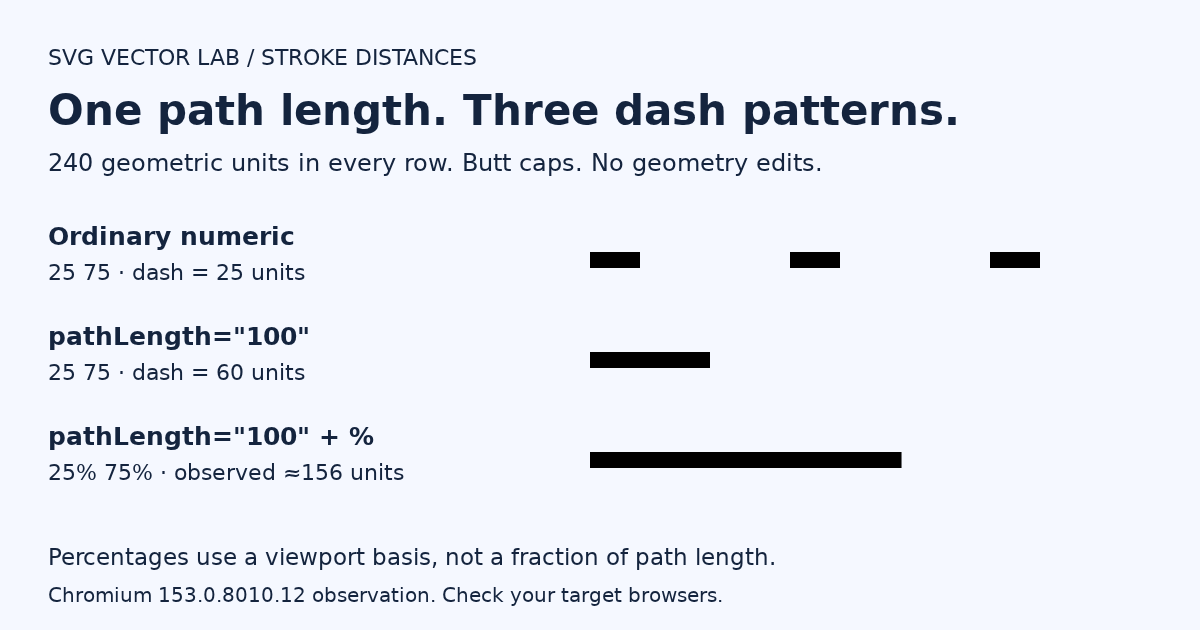
A 240-unit line, three different dash patterns
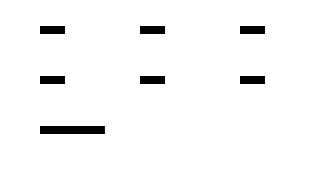
Use this minimal comparison. The rows have matching horizontal geometry, with different vertical positions so you can compare them. Explicit butt caps make the dash endpoints easier to inspect. For the role of caps and ordinary dash patterns, see the SVG strokes guide. SVG 2 dashing
<svg xmlns="http://www.w3.org/2000/svg" width="320" height="180" viewBox="0 0 320 180" role="img" aria-labelledby="dash-title dash-description">
  <title id="dash-title">Numeric and percentage SVG dashes</title>
  <desc id="dash-description">Three 240-unit lines compare numeric dashes, normalized numeric dashes, and percentage dashes.</desc>
  <path id="raw" d="M 40 30 H 280" fill="none" stroke="#000" stroke-width="8" stroke-linecap="butt" stroke-dasharray="25 75"/>
  <path id="normalized" d="M 40 80 H 280" pathLength="100" fill="none" stroke="#000" stroke-width="8" stroke-linecap="butt" stroke-dasharray="25 75"/>
  <path id="percentage" d="M 40 130 H 280" pathLength="100" fill="none" stroke="#000" stroke-width="8" stroke-linecap="butt" stroke-dasharray="25% 75%"/>
</svg>
In the executed static fixture, the ordinary numeric row painted x40 to x65, x140 to x165, and x240 to x265. The normalized numeric row painted x40 to x100: a 60-unit dash, one quarter of the 240-unit line. Its following gap accounts for the remaining 180 units. The percentage row painted approximately x40 to x196, visibly different from the normalized numeric result. These are fixture observations from Chromium 153.0.8010.12 on Linux, not a cross-browser compatibility guarantee.
Normalization is not a shape edit
Think of pathLength as a ruler for distance-along-path calculations. The d attribute still describes the geometry. Setting the ruler to 100 does not shorten this line to 100 geometric units. If you need to change its points or curves, edit its drawing commands instead; the path commands guide explains that separate task. SVG 2 paths
For this straight-line example, the numeric conversion is explicit:
dash: 240 × 25 / 100 = 60 geometric units
    gap:  240 × 75 / 100 = 180 geometric units
These calculations explain the normalized numeric row, not the percentage row. SVG 2 paths SVG 2 dashing
Why 25% does not mean a quarter of the path
The percentage basis for stroke-dasharray is the normalized diagonal of the current SVG viewport, not the path's length. With a viewBox, use its dimensions for that basis. For this example, sqrt(320² + 180²) / sqrt(2) is approximately 259.615; 25% of that is approximately 64.904. Those figures describe percentage resolution, not a promise that a browser paints a 64.904-unit dash when pathLength is also present. SVG 2 dashing SVG coordinate units
There is an important specification-versus-test distinction here. The SVG 2 paths text says pathLength does not affect percentage distance-along-path calculations. Yet this fixture's percentage row painted approximately 156 units in the tested Chromium build. Do not present that browser observation as a universal rule or silently replace it with the specification expectation. For proportional numeric dashes in this example, use 25 75 with pathLength="100". Test percentage-dependent designs in the browsers you support. SVG 2 paths
Why getTotalLength() still returns 240
Open the comparison SVG as its own browser document, then open that document's developer tools console and run:
["raw", "normalized", "percentage"].map(id => ({
  id,
  length: document.getElementById(id).getTotalLength()
}));
All three paths returned 240 in the executed fixture. That matches the SVG geometry API: getTotalLength() returns the browser-computed path length in user units without taking pathLength into account. A return value of 240 does not mean normalization failed. SVG geometry API
Check the file you actually export
For this exact fixture, loading the source in SVG Vector Lab and downloading it as SVG retained pathLength="100" and the exact d values. A black-stroke pixel comparison at the three row centers found identical painted intervals before and after download, including the percentage row. The comparison excluded the white background added by the editor. This checks the demonstrated file in Chromium 153.0.8010.12, not every SVG feature, browser, or PNG export.
Try the comparison in the SVG path editor. After downloading, reopen the SVG and compare its attributes and rendered dashes. If your next step is a raster image, use the SVG-to-PNG tool and inspect that result separately.
The practical distinction is simple: use numeric normalization for the demonstrated proportional dash, keep geometry edits separate, and verify the exported result rather than assuming it matches. SVG 2 paths SVG 2 dashing
Research and fixture checked October 20, 2026. Numeric results describe the exact downloadable comparison; test other browsers and export formats separately.